Blog Posts
Zone 1 Hot Work Habitat: A 2026 Buying Guide
Choosing a Zone 1 hot work habitat starts with the worksite and the task, not the zone label alone. Before comparing configurations, define the planned hot work, check the site documentation, and note the space and access constraints that will shape the setup.
Monitoring and shutdown features are important parts of that comparison. PetroHab automatic shutdown systems monitor differential pressure and gas levels and are ATEX- and IECEx-certified (IEC 60079-13). Review the enclosure configuration and system documentation against the requirements for the specific work location. A certification or individual feature does not establish that every configuration fits every site.
This guide sets out practical checks for a Zone 1 project, from panel construction and system controls to worksite layout and procurement. It also explains how PetroHab’s pressurized enclosures, patented Quadra-Lock® technology, and lease or sale options can inform the evaluation. Use the project scope and applicable site documentation as the basis for deciding what configuration to assess.
Key Takeaways
- Evaluate a Zone 1 hot work habitat against the site documentation, task, and work conditions rather than assuming one configuration fits every location.
- Review panel construction, pressure and gas monitoring, and automatic shutdown as separate parts of the system.
- Compare habitat configurations and lease or sale options using the work scope, access, enclosure layout, and expected project duration.
- Before reviewing system documentation, record the hot-work tasks, intended location, access constraints, and expected project duration.
- Compare the stated features of Petro-Habitat™, Petro-Shield™, and Petro-Lite™ Hot Work Safety Enclosures with the project’s setup and layout requirements.
What Zone 1 Means for Temporary Hot Work Habitat Selection
Zone 1 describes an area where an explosive atmosphere of flammable gas, vapour, or mist is likely to occur occasionally during normal operation. For a temporary hot-work project, that classification is a key input to the equipment review, but it does not specify a complete habitat configuration. Evaluate the Zone 1 hot work habitat against the conditions and requirements documented for the intended work location.
Begin with the site’s hazardous-area documentation and the proposed work area. Record the hot-work tasks, project duration, and procedures that govern the work. A habitat provides an enclosure for hot work. It does not itself authorize the task or replace the project’s permit process, risk assessment, or operating procedures.
A useful principle is: Zone classification informs equipment evaluation, while project documentation and work scope determine the habitat configuration to assess.
This video provides a visual introduction to pressurized habitats presented for hazardous-area work:
How Zone 1 Classification Affects the Equipment Review
Use the classification as a description of the site condition, not as a complete habitat specification. Connect it to the documents that define the hazardous area and to the task planned inside the enclosure. Check that the documented area and intended work location match; an assessment for one location should not automatically be applied to another.
Before comparing equipment, gather the information that will shape the review:
- The documented hazardous-area classification and intended work location.
- The welding, grinding, or other hot-work activities planned inside the enclosure.
- Site constraints that may affect placement, access, or setup.
- Project procedures and equipment documentation relevant to the work.
With these details recorded, compare the proposed system’s documented features and configuration with the project requirements. The zone label alone does not settle the selection.
What a Pressurized Hot Work Habitat Is Designed to Do
PetroHab LLC habitats are modular, portable, fire-retardant enclosures designed for pressurized operation. They provide an enclosed workspace for hot-work activities in environments where ignition hazards require deliberate controls. The habitat is one part of the project’s wider safety arrangements, so assess its configuration alongside the site conditions and work procedures.
For more context on enclosure design and use, explore this hot work safety enclosure guide. It introduces the habitat’s role before you compare materials, monitoring, shutdown systems, and job requirements.
How Habitat Materials, Monitoring, and Shutdown Systems Differ
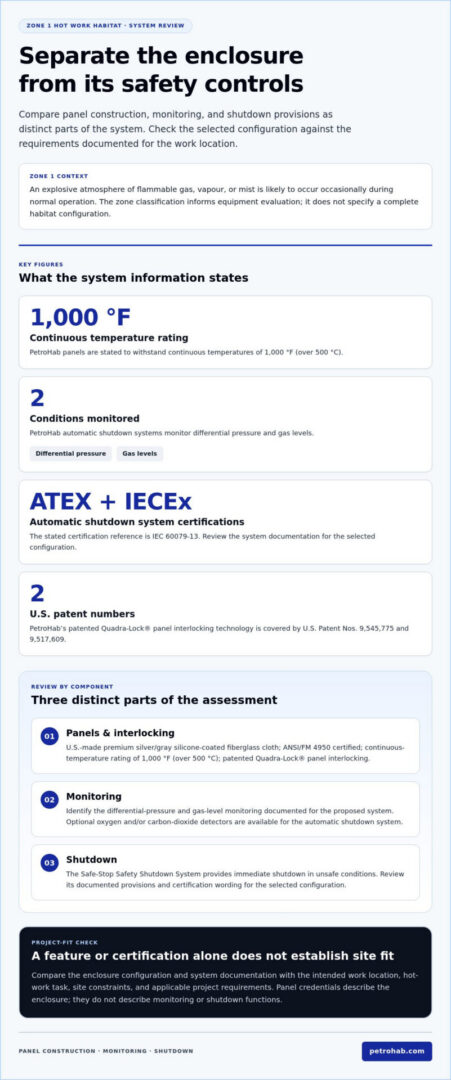
Review the enclosure and its controls as distinct parts of the system. Panel material and interlocking describe the physical enclosure. Monitoring tracks specified conditions, while an automatic shutdown system responds when conditions are unsafe. For a Zone 1 hot work habitat, compare the documentation for each component with the project requirements instead of treating one credential or feature as a substitute for the others.
Panel Construction and Quadra-Lock® Interlocking
PetroHab panels are made from U.S.-made premium silver/gray silicone-coated fiberglass cloth. They are ANSI/FM 4950 certified and can withstand continuous temperatures of 1,000 °F (over 500 °C). All habitats use PetroHab’s patented Quadra-Lock® panel interlocking technology, covered by U.S. Patent Nos. 9,545,775 and 9,517,609. Record these material and design details as part of the enclosure review.
Keep the panel assessment focused on what the product information establishes: cloth material, certification, continuous-temperature rating, and interlocking technology. These details describe the enclosure’s stated construction. They do not describe the monitoring or shutdown functions, which require a separate review.
Differential Pressure, Gas Detection, and Safe-Stop
PetroHab automatic shutdown systems monitor differential pressure and gas levels. They are ATEX- and IECEx-certified (IEC 60079-13). The Safe-Stop Safety Shutdown System provides immediate shutdown in unsafe conditions. Optional oxygen and/or carbon-dioxide detectors are available for the automatic shutdown system.
PetroHab automatic shutdown systems monitor differential pressure and gas levels and are ATEX- and IECEx-certified (IEC 60079-13). This states the monitoring functions and certification separately. For the project review, compare the documented monitoring and shutdown provisions with the site requirements and selected configuration. Panel credentials alone do not describe these controls.
Compare the System by Component
A component-by-component comparison shows what each element contributes and which documentation supports it. Use this format to keep enclosure construction distinct from safety controls when discussing the proposed setup with the project team.
- Panels: Record the cloth material, ANSI/FM 4950 certification, continuous-temperature rating, and Quadra-Lock® technology.
- Monitoring: Identify differential pressure and gas-level monitoring, along with any optional oxygen and/or carbon-dioxide detectors included in the selected system.
- Shutdown: Record the Safe-Stop system’s immediate shutdown function and the system’s certification wording.
For more detail on monitoring and shutdown controls, consult PetroHab’s advanced hot work safety systems guide. Use the component-by-component view to keep the evaluation precise: materials, monitoring, and shutdown each address a different part of the proposed setup.
Compare Temporary Zone 1 Habitat Options Against the Job
Compare configurations with the job’s documented requirements, not with an assumed ranking of habitat types. Project duration, work-area layout, access constraints, and each configuration’s stated features provide a practical basis for the review. A Zone 1 hot work habitat needs to be assessed against the task and site conditions; the zone classification alone does not establish the right layout.
Match the Habitat Configuration to the Worksite
PetroHab configurations have distinct stated features. Use those details as comparison points, then relate them to the project drawings and setup requirements.
| Project consideration | What to evaluate | Stated configuration details |
|---|---|---|
| Project duration | Record the expected period of use and whether the project includes recurring work or maintenance needs. | Duration helps inform whether leasing or purchasing fits the project plan. It does not determine a configuration by itself. |
| Enclosure layout | Compare the work area, required enclosure arrangement, and features relevant to the planned task. | Petro-Habitat™ is full-featured, with interchangeable panels, pneumatic air supply, and window panels. Intrusion/protrusion panels are also a stated Petro-Habitat™ configuration feature. |
| Site access | Document the route to the work area and any constraints that affect equipment placement or setup. | Petro-Shield™ is mobile and modular, expanding in 4-foot increments. Compare these stated features with the site layout without assuming they resolve every access constraint. |
| System configuration | Match the selected system documentation and configuration to the project requirements. | Compare stated features and relevant documentation. Do not infer performance or suitability from a product name. |
For example, if access to the work area is restricted, record the constraint and assess the mobile, modular Petro-Shield™ configuration against the documented setup needs. If the work plan calls for a particular enclosure layout, include Petro-Habitat™ panel and window features in the comparison. These examples help frame the review; neither establishes a universal best choice.
Choose a Procurement Route for the Project
PetroHab offers lease and sale options and stands almost alone in offering its patented and certified habitat systems for either route. Consider expected project duration, recurring maintenance needs, and how the system will be used across planned work. These planning factors help frame the procurement decision without relying on price or lead-time comparisons.
Keep the decision record concise: note duration, access constraints, layout, relevant configuration features, and procurement route. This gives the project team a clear basis for reviewing habitat fit. PetroHab’s habitat procurement guide offers further context for comparing project requirements with enclosure options.
For a project-specific evaluation, review PetroHab habitat options alongside the worksite documentation and task scope.
Use a Project Checklist to Evaluate a Zone 1 Habitat
A structured review turns the site classification and job requirements into a practical equipment evaluation. Before selecting temporary Zone 1 equipment, record the work location, hot-work tasks, access constraints, and expected project duration. Then review the system in sequence, keeping site approvals and procedures distinct from the habitat’s documented product features.
Define the task, review site requirements, compare system documentation, assess the configuration, and choose the procurement route.
- Define the work scope. Identify the planned welding, grinding, or other hot-work activity, where it will take place, and the expected project duration. Describe the work area and any conditions that may affect the enclosure arrangement. This gives the equipment review a specific task to address.
- Review site requirements. Use applicable site documentation to establish the hazardous-area classification and project requirements for the intended work location. Record access routes, nearby equipment, space constraints, and any required enclosure layout. Include the site’s approval process and operating procedures in the project plan. Habitat features do not replace them.
- Compare system documentation. Review the information for the proposed panels, monitoring, and automatic shutdown system. Compare stated materials and certifications with the project’s documented requirements. Keep each feature in its proper category: enclosure documentation describes the panels, while system documentation covers monitoring and shutdown functions.
- Assess the configuration. Compare the planned work area and setup constraints with the habitat’s stated configuration. Consider whether the layout corresponds to the task, whether the equipment can be positioned within the site constraints, and whether project duration affects the configuration decision. Do not treat one feature as proof that the complete setup suits every condition.
- Choose the procurement route. Consider whether leasing or purchasing aligns with the expected duration, future project plans, and maintenance needs. PetroHab offers both options. Record the selected route so the decision reflects how the habitat will be used, not only the immediate work scope.
Document the Work Scope and Site Requirements
Make the record specific enough to guide a technical review. Note the work location, planned task, nearby equipment, access limitations, enclosure layout needs, and project duration. Reference the documents that establish the applicable classification and site requirements. This keeps project approvals and procedures visible without confusing them with the habitat’s stated features.
Review Product Documentation and Training Needs
Include assembly, disassembly, and maintenance in the project plan. PetroHab provides training and certification programs covering these activities, so teams can account for training needs alongside setup and maintenance planning. Training supports project preparation; it does not replace site procedures or determine whether a configuration meets the documented requirements.
Use your completed project record to evaluate PetroHab habitat options for your Zone 1 project.
Evaluate PetroHab Habitats for Zone 1 Project Requirements
Once the work scope, site conditions, and relevant documents are assembled, compare PetroHab configurations with the actual layout and setup needs. Product features can narrow the options, but they do not replace a project-specific review of hazardous-area documentation and site requirements. For a Zone 1 hot work habitat, match documented configuration details to the planned work, access, and installation conditions.
Compare the Confirmed PetroHab Configurations
Each configuration has stated features that can inform layout and setup planning. Use them as comparison points rather than as rankings:
- Petro-Habitat™: Interchangeable panels, pneumatic air supply, window panels, and intrusion/protrusion panels are specific features to compare with the work-area layout and project setup requirements.
- Petro-Shield™: This mobile, modular enclosure expands in 4-foot increments. An optional air conditioner or heater can be attached. Compare these details with the available space and the configuration needed for the job.
- Petro-Lite™ Hot Work Safety Enclosure: No more than two people can set it up in 5 minutes. It attaches to standard scaffolding, with optional stand-alone scaffolding available when standard scaffolding is not present.
These features support a focused comparison. Note whether the project layout calls for interchangeable panels, whether standard scaffolding is available for the planned setup, and whether Petro-Shield™ expansion in 4-foot increments fits the available work area. Use the site documentation and task scope to assess how each configuration fits the project.
Plan the Next Step for Lease or Sale
PetroHab manufactures its products in the USA using U.S.-sourced components and designs custom hot work safety enclosures in-house for project-specific requirements. PetroHab reports well over a million incident-free man-hours. These details provide context for the evaluation, but the configuration and system documentation still need to be reviewed against the site requirements.
For a focused project discussion, prepare the work scope, intended work area, expected duration, access constraints, and relevant documentation needs. This information helps frame the configuration review and procurement route. PetroHab offers both lease and sale options, allowing project requirements to guide the procurement discussion.
Discuss a PetroHab habitat for your Zone 1 project and outline the worksite conditions, task, and configuration requirements.
Put the Project Requirements Into Action
A clear selection rationale helps everyone involved in planning the work understand how the intended task and work area relate to the chosen configuration, supporting documentation, and procurement route. Keep that rationale with the project record as plans develop, so the equipment review remains connected to the actual job rather than assumptions based on a zone designation alone.
For a Zone 1 hot work habitat, bring the project requirements into a focused discussion about system fit. Clear details about the task and site make the configuration review more practical.
Share your project requirements with PetroHab to discuss lease or sale options for your work scope and site.
Frequently Asked Questions
What is a Zone 1 hot work habitat?
A Zone 1 hot work habitat is a pressurized enclosure used to create a controlled workspace for hot work in a hazardous-area setting. Assess its suitability against the site classification, project requirements, selected configuration, and documented system capabilities. The site classification should be considered alongside the task and work conditions. The habitat does not replace project approvals or site procedures, and zone terminology should be checked against applicable site documentation.
What should I compare when selecting temporary equipment for Zone 1 work?
Compare the project documentation, monitoring and shutdown provisions, panel information, enclosure layout, site access, and expected period of use. Tie the comparison to the actual task. For example, if equipment or access routes limit where an enclosure can be positioned, record that constraint and assess the proposed layout against it. A certification or individual product feature is one part of the review, not proof that every configuration fits every site.
Are PetroHab automatic shutdown systems ATEX- and IECEx-certified?
Yes. PetroHab automatic shutdown systems are ATEX- and IECEx-certified (IEC 60079-13) and monitor differential pressure and gas levels. The Safe-Stop Safety Shutdown System provides immediate shutdown in unsafe conditions. Optional oxygen and/or carbon-dioxide detectors are available. In a project review, keep documentation for the shutdown system distinct from documents covering panel materials so each component can be assessed against its relevant requirements.
What materials are used in PetroHab habitat panels?
PetroHab panels are made from U.S.-made premium silver/gray silicone-coated fiberglass cloth. They are ANSI/FM 4950 certified and can withstand continuous temperatures of 1,000 °F (over 500 °C). The panels use patented Quadra-Lock® interlocking technology, covered by U.S. Patent Nos. 9,545,775 and 9,517,609. Record panel information separately from monitoring and shutdown details so each credential is reviewed in context.
Can I lease or buy a PetroHab hot work habitat?
Yes. PetroHab offers habitat systems for lease or sale. Consider the project duration, whether similar work is expected to recur, whether ownership fits the equipment plan, and how maintenance will be managed. If the team expects repeated work, include future use and maintenance responsibilities in the procurement review. These factors help frame the route for the project without establishing a price or lead-time estimate.
Does PetroHab offer non-pressurized hot work safety enclosures?
Yes. PetroHab offers non-pressurized Hot Work Safety Enclosures for non-classified areas. This is distinct from selecting a pressurized habitat for Zone 1 work. Start the equipment assessment with the site classification and project documentation, then compare the intended work-area requirements with each enclosure’s features. Non-pressurized and pressurized configurations are not interchangeable simply because the planned task involves hot work.
What training does PetroHab provide for habitat systems?
PetroHab provides training and certification programs for habitat and shutdown-system assembly, disassembly, and maintenance. Include these activities in project planning by identifying which teams will handle setup, take-down, and ongoing maintenance, then accounting for relevant training needs in the work plan. Assigning equipment-handling responsibilities before mobilization helps the project team coordinate its preparation. The programs cover the stated activities; no particular duration or outcome should be assumed.