Blog Posts
Understanding Hazardous Area Classification Drawings and Pressurized Habitat Ratings
What does a pressurized habitat zone rating actually tell you when hot work is planned inside a classified area? The drawing maps the hazard around the worksite, but it doesn’t by itself establish whether a habitat or its equipment is suitable for the task. That distinction matters when boundaries, symbols, and revisions must be interpreted against current site conditions.
You may already know that zone labels guide risk controls, while certified equipment is assessed against applicable requirements. A pressurized habitat adds another layer: protective controls, including pressure and gas-level monitoring, must be considered alongside the classification, not treated as a replacement for it. A drawing can inform planning, but its legend, revision status, and relationship to conditions in the field need careful review.
This article explains how to read the information that matters on hazardous area classification drawings, distinguish area zones from equipment certifications and habitat controls, and carry the right details into a project-specific hot-work review. You’ll see why a zone boundary is a starting point, not a complete habitat suitability decision, and how PetroHab pressurized habitats and the Safe-Stop Safety Shutdown System fit into the broader planning picture.
Key Takeaways
- Start with the drawing title, facility reference, date, revision, and approved legend before interpreting its boundaries.
- Use the map to identify classified-area information, but don’t treat it as approval for a specific hot-work activity.
- Keep area classification, equipment certification, and habitat operating controls distinct when reviewing project documents.
- For a pressurized habitat zone rating, separate what the drawing confirms from assumptions about current site conditions and habitat suitability.
- Bring the work location, relevant boundary, drawing revision, and legend into the project review; consider Petro-Habitat™ selection and operating controls separately.
What Hazardous Area Classification Drawings Show, and What They Do Not
A hazardous area classification drawing is a project document that identifies areas assessed as having a potential explosive-atmosphere hazard and shows their spatial boundaries. It helps readers understand where a particular classification applies in relation to equipment, structures, and planned work locations. The drawing is a map of assessed conditions, not a complete hot-work procedure or a stand-alone authorization.
Interpret its information through the drawing’s own legend, revision details, and governing site documentation. Symbols, boundary lines, notes, and zone labels can vary by project. A line on a plan may also represent a defined extent or elevation that needs context from related drawings. If the drawing’s meaning or status is uncertain, don’t treat an assumption as a confirmed site condition.
How hazardous-area zones describe the surrounding area
For explosive gas atmospheres, Zone 0, Zone 1, and Zone 2 describe different levels of likelihood and duration. The zone assigned to an area reflects the basis of the site assessment; it is not a generic label for every hazard or activity within that space.
Use the project legend and applicable references to interpret the specific definitions. Don’t infer an hour threshold from the zone number alone. The drawing’s notes and related site documents provide the context for applying a classification to a location.
Why a zone label is not a habitat rating
A zone label describes classified-area information. Equipment certification concerns whether particular equipment meets applicable requirements for its intended use, while habitat design and certification concern the protective system and its controls. These are related inputs, but they answer different questions.
A hazardous area classification identifies the assessed environment; it does not certify equipment or approve a specific hot-work activity. A Zone 1 or Zone 2 label alone, for example, doesn’t establish project-specific authorization to weld at a proposed location. The work plan still needs a separate review of the task, site conditions, controls, and applicable procedures.
This distinction is central to interpreting a pressurized habitat zone rating. A habitat’s suitability can’t be read directly from the zone label on a site drawing. Pressurized habitat planning is a separate project review informed by current site documentation, the exact work location, and the habitat’s design and operating controls. Positive pressure and gas-level monitoring are relevant habitat controls; they don’t replace understanding the area classification.
Before using a drawing as a planning input, establish what document it is, what its legend defines, which revision applies, and how it relates to the worksite. Keep information shown on the drawing separate from assumptions about present conditions. That discipline makes the classification useful without asking it to answer questions outside its purpose.
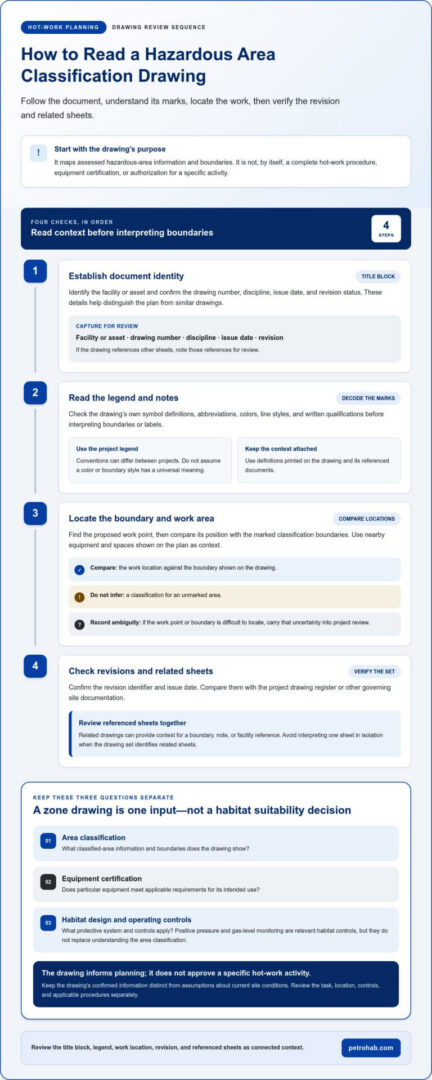
How to Read a Hazardous Area Classification Drawing Step by Step
Use a fixed review sequence rather than trying to interpret every symbol at once. The sequence helps you establish what the drawing covers, understand its notation, locate the proposed work, and identify whether the document is current for the project.
- Establish document identity. Read the title block for the facility or asset, drawing number, discipline, issue date, and revision status. These details distinguish the document from similar plans and help connect it to the correct facility area. If the drawing references other sheets, note those references for review.
- Read the legend and notes. Check symbol definitions, abbreviations, colors, line styles, and any written qualifications before interpreting the drawing. Conventions can differ between projects, so don’t assume that a color or boundary style has a universal meaning. Use the definitions printed on the drawing and its referenced documents.
- Locate the boundary and work area. Find the proposed work location, then compare its position with the marked classification boundaries. Note nearby equipment and spaces shown on the plan, but don’t infer classifications for unmarked areas. If the work point or boundary is difficult to locate, record the ambiguity for project review.
- Check revisions and related sheets. Confirm the revision identifier and issue date, then compare them with the project’s drawing register or other governing site documentation. Where the drawing set identifies related sheets, review them together so a boundary, note, or facility reference isn’t interpreted in isolation.
Start with the title block, legend, and revision
Document context comes first. A facility name and drawing number help identify the plan, while discipline and date indicate what document you’re reading and when it was issued. The legend explains how to interpret its marks; revision information shows which issued version is under review. Check referenced sheets for matching context and relevant notes.
The legend explains what the marks mean, and the current revision establishes which issued drawing those meanings apply to. Read them together before relying on a symbol or boundary in a work review. If the legend is absent, unclear, or inconsistent with related documentation, preserve that as an open issue rather than assigning your own meaning.
Trace classified boundaries and nearby work locations
Mark the proposed work location on the relevant plan and identify its relationship to each nearby boundary. Check whether the drawing shows adjacent equipment, rooms, or facility features that help orient the location. Don’t extend a boundary beyond what the drawing represents or treat nearby labels as applying automatically to the work point.
For U.S. projects, OSHA’s regulations for hazardous locations address electrical equipment and wiring in classified locations. Keep that scope distinct from the drawing-reading task. Record unclear symbols, missing references, or conflicts between sheets for project-specific resolution. This record helps reviewers separate confirmed drawing information from assumptions relevant to pressurized habitat zone rating and hot-work planning.
Once the document review is complete, carry the identified location, drawing reference, legend, revision, and unresolved questions into the project review. PetroHab’s pressurized habitat planning is considered alongside site documentation and operating controls, not as a substitute for interpreting the drawing.
Zone Classification, Equipment Certification, and Habitat Controls: Key Differences
These terms describe separate layers of a hot-work safety review. An area classification identifies the assessed environment. Equipment certification applies to specified equipment or systems. Operational controls describe how a habitat and the work are managed. Treating these as interchangeable can leave a gap between what the site drawing shows and what the project needs to decide.
| Review element | What it describes | What it does not establish by itself |
|---|---|---|
| Area classification | Classified-area information and boundaries represented by the approved drawing and supporting site documents. | Certification of a product or authorization for a particular hot-work task. |
| Equipment certification | Whether specified equipment or a system has certification for its defined scope. | That every site condition, work location, or operating decision is covered. |
| Operational controls | Controls used to operate the habitat and manage the planned work. | A replacement for understanding the site classification or following project procedures. |
A classification drawing describes the area; it is not itself a product certificate. Likewise, a certificate should be read within its stated scope, not treated as blanket approval for a worksite or activity. Applicable standards and project references must be interpreted in context, using the approved documentation for the specific site.
What the area classification tells the project team
The approved drawing represents classified areas and their boundaries as documented for the facility. The project team uses that information to situate the planned task and identify relevant site conditions for review. A boundary near the work location matters, but it doesn’t answer every question about the work method or controls.
Keep the classification tied to the drawing and supporting site references. Don’t infer requirements from a zone label without checking the applicable project documentation and governing references. This keeps the drawing in its proper role: a planning input, not a standalone decision.
What habitat monitoring and certification address
PetroHab automatic shutdown systems monitor differential pressure and gas levels. Optional oxygen and/or carbon-dioxide detectors are available. These are habitat controls, distinct from the site’s area classification. They provide information relevant to habitat operation, but don’t replace review of the surrounding classified area or project-specific hot-work controls.
PetroHab’s automatic shutdown systems are ATEX- and IECEx-certified (IEC 60079-13). The certification relates to the system’s defined scope; it does not independently determine whether a proposed task is authorized under site procedures. The Safe-Stop Safety Shutdown System provides immediate shutdown in unsafe conditions. That function is one part of the control approach, not a promise that every hazard or work decision is resolved by the system.
For a pressurized habitat zone rating review, keep three records distinct: the area classification, the applicable equipment or system certification, and the operating controls planned for the task. Compare them during project review, then resolve any scope or site-condition questions through the governing documentation and work process.
A Practical Review Checklist Before Using Drawings for Hot-Work Planning
A drawing review is useful only when its findings are kept distinct from assumptions about conditions in the field. Use the checklist below to capture what the document establishes, what remains uncertain, and which questions need to enter the project’s established engineering and safety review.
Check the document before relying on its markings
- Document identity: Confirm the facility, drawing number, discipline, and work area match the project under review. Note the issue date and revision reference.
- Legend and notes: Read the applicable symbol definitions, boundary labels, abbreviations, and notes. Record any marks that are illegible or whose meaning isn’t defined in the drawing set.
- Boundary: Locate the proposed work area against the boundaries shown. Record what the drawing explicitly indicates, including nearby features that help identify the location.
- Revision and references: Compare the drawing’s revision information with the project’s controlled documents. Review related sheets where referenced, and note any conflicting or incomplete details.
- Work location: Describe where the proposed hot work sits in relation to the marked area. If the location can’t be identified clearly, flag it for formal review instead of estimating its position.
Keep two records: confirmed drawing information and conditions or details that still require verification. For example, a drawing may mark a boundary near a work location, while current site conditions or the exact work point remain unresolved. Don’t convert that uncertainty into a conclusion about the present hazard or the authorization to proceed.
Turn drawing observations into planning questions
Use the review to identify the decisions that belong to the project’s established process. Which documents govern work planning at this site? Does the proposed location align with the boundary shown? Are there discrepancies between the drawing and other project records? What additional site information does the review require? These questions keep the drawing useful without asking it to approve the task.
Flag conflicting revisions, missing legends, unclear boundary extents, and discrepancies with observed conditions for resolution through the project’s engineering and safety review. Don’t resolve them by selecting the more convenient interpretation. A map, zone label, or habitat control isn’t standalone work authorization.
This disciplined approach also supports review of a pressurized habitat zone rating: use classification information as one planning input, then assess habitat selection and operating controls separately. For broader context on applicable references, consult the hazardous environment standards guide.
Bring the drawing reference, revision, marked work location, confirmed information, and unresolved questions into the project review. To explore how PetroHab pressurized habitats fit into classification-informed planning, review PetroHab habitat options.
How PetroHab Pressurized Habitats Fit into Classification-Informed Planning
A hazardous area classification drawing gives the project team spatial context. It does not select a habitat or define the controls needed for a particular hot-work task. Those decisions belong in a separate project review that considers the task, current site documentation, habitat design, and operating controls together. This keeps the drawing in its proper role while giving habitat information a clear place in the planning process.
Petro-Habitat™ is PetroHab’s main pressurized Hot Work Safety Enclosure (HWSE). All PetroHab habitats use patented Quadra-Lock® panel interlocking technology, protected by U.S. Patent Nos. 9,545,775 and 9,517,609. These details describe the habitat system. They don’t change the meaning of a site’s zone boundaries or establish authorization for hot work at a specific location.
Connect drawing review with habitat system information
Bring the drawing and habitat information into the same project discussion, but evaluate them for different purposes. Use site documents to understand the classified area and planned work location. Review the habitat’s system information and operating controls as separate inputs to the task plan.
PetroHab automatic shutdown systems monitor differential pressure and gas levels. The systems are ATEX- and IECEx-certified (IEC 60079-13). That certification describes the system’s certification status; it doesn’t replace the project-specific review or the site’s procedures. Reviewers still need to consider the task, the applicable site information, and the controls required for the planned work.
Keep the distinction explicit in planning records: the drawing informs the area assessment, while habitat selection and operating arrangements are evaluated for the work scope. That separation helps prevent a pressurized habitat zone rating from being treated as a single approval that resolves every site or task question.
For a deeper explanation of enclosure design and technology, the pressurized welding habitats guide provides additional background. Use that technical context alongside, not in place of, the project’s controlled site documents.
Understand PetroHab’s role in the next planning step
PetroHab manufactures, leases, sells, and maintains Hot Work Safety Enclosures for hazardous industrial environments. The company stands almost alone in offering its patented and certified habitat systems for either lease or sale. That offering supports project planning, while the site’s engineering and safety process remains central to work decisions.
As the review progresses, keep the drawing reference, work scope, relevant habitat information, and operating controls connected in the project record. This gives the team a traceable basis for discussing habitat fit without confusing area classification, system certification, and work authorization. To explore PetroHab habitat solutions for classification-informed planning, visit PetroHab’s habitat solutions.
Make the Next Review Traceable
Turn drawing interpretation into a consistent handoff between engineering, safety, and the people preparing the work package. Record the document basis for each review so that later changes to the task, work location, or site information can be assessed against the same planning assumptions. This gives the team a clear starting point when conditions or scope change.
A pressurized habitat zone rating shouldn’t become a shortcut for that decision. Keep habitat selection connected to the actual work scope and the project’s established review process. When new information emerges, revisit the planning basis rather than relying on an earlier interpretation without context.
PetroHab’s pressurized habitat solutions can be considered as part of that project-specific planning. Explore the available options and their role in hot-work preparation through PetroHab pressurized habitat solutions.
With a clear review trail and disciplined planning, teams can move forward with greater confidence in their decisions.
Frequently Asked Questions
What is a hazardous area classification drawing?
It’s a controlled project document that shows where hazardous-area classifications apply within a facility. The drawing may use plan views, elevations, symbols, and notes to locate those areas. For a proposed work point near a boundary, related sheets may be needed to understand the location in context. Treat the drawing as documented classification information, not a live measurement of atmospheric conditions or a work permit.
How do I read hazardous area zones on a drawing?
Start with the drawing’s own legend and notes, then find the zone labels and trace the associated boundaries. Don’t assume a color, hatch, or line style has the same meaning on every project. For example, if a label appears near a vessel or room, use the boundary and drawing references to establish its extent rather than assigning the label to nearby spaces automatically.
What is the difference between a hazardous area zone and an equipment rating?
A hazardous-area zone describes the assessed location; an equipment rating or certificate relates to particular equipment and its defined conditions of use. They aren’t interchangeable. A device selected for a classified location still needs to match the applicable equipment documentation and project requirements. A zone shown on a drawing doesn’t establish the certification status of each item installed within that boundary.
Does a Zone 1 or Zone 2 label automatically approve hot work?
No. The label identifies classification information for an area, not permission to perform a specific task. Hot work planning must follow the site’s established review and authorization process, which considers the proposed activity and relevant site conditions. For instance, a work point shown near a boundary still requires a project decision about the location and controls. Don’t use a zone label as a substitute for that decision.
Can a pressurized habitat be used in a classified area?
A pressurized habitat may be considered for hot work in a classified area, but its suitability depends on the project-specific assessment, habitat system information, and applicable site procedures. The phrase pressurized habitat zone rating shouldn’t be treated as a single approval covering every location or task. Review the proposed work and current site documentation together before determining how a habitat fits the project controls.
What does IEC 60079-13 relate to for pressurized habitats?
IEC 60079-13 relates to requirements for pressurized rooms and artificially ventilated rooms used as protection in hazardous locations. PetroHab states that its automatic shutdown systems are ATEX- and IECEx-certified (IEC 60079-13). Certification information describes a system’s certification, but doesn’t decide whether a particular work scope is authorized. Keep that distinction clear in project records and apply the site’s own procedures.
What should I do if the drawing legend or revision is unclear?
Don’t guess at a symbol’s meaning or rely on a version whose status is uncertain. Record the drawing reference, the unclear notation or revision detail, and the work location affected. Then route the discrepancy through the project’s established engineering and safety review so it can be resolved against controlled site documentation. Keep the interpretation open until the relevant information is clear.